


Logitech RS Track & Round: Choosing the Right Wheel Skin
Choosing stickers for a Logitech RS wheel starts with the rim, not the base. If you use an original RS Track Wheel or RS Round Wheel, the Lovely Stickers references featured here are listed for those two rims. The decoration follows their central metal face. It is not a wrap for the separate RS Wheel Hub, its buttons, or the motor base.
That distinction matters in a modular setup. An RS50 base, a PRO base and a different rim can appear in similar-looking cockpit photos, but the base name alone does not identify the sticker you need. Here is how to recognise the parts, choose the right collection and compare two livery options.
Cover: original RS Track Wheel without the separate Hub. Product image: Logitech G.
RS Wheel Hub, Track Wheel and Round Wheel: what is each part?
The RS Wheel Hub carries the buttons, rotary controls, adjustable gear-shift paddles and LIGHTSYNC RGB rev lights. A compatible rim bolts onto it; the quick release connects the assembly to a compatible Logitech G direct-drive base. Logitech also offers MOMO × Logitech G rims for this Hub.
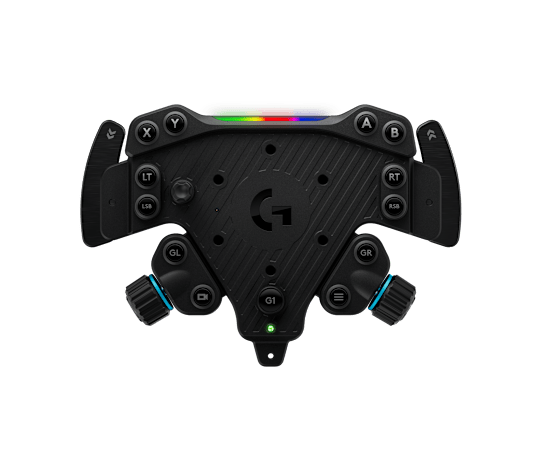
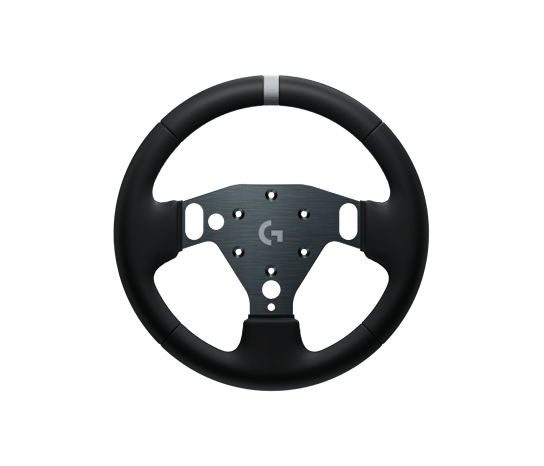
The RS Track Wheel is the open-top rim in the cover image, with shaped TPE grips. The RS Round Wheel has a full circular grip with silicone leather. Both attach to the RS Wheel Hub. For a skin, look at the exposed central plate and its openings, rather than treating the entire wheel assembly as one surface.
Which Lovely Stickers collection matches your setup?
Start with the component in front of your hands. The following distinctions help you avoid ordering by the name printed on your base.
| Your wheel or rim | Where to look |
|---|---|
| Original Logitech RS Track or RS Round | Logitech RS Wheel stickers; check the individual listing and flat template. |
| Original Logitech G PRO wheel | Logitech G PRO Wheel stickers; a separate collection. |
| SIMUBE GT3 rim for Logitech RS Hub | SIMUBE Logitech RS GT3 rim stickers; a different rim and template. |
| Another rim, including a MOMO or Formula model | Confirm that exact rim before ordering; Hub compatibility does not establish sticker fitment. |
A useful pre-order check is to take a straight-on photo with the wheel centred. Compare the outside edge of the metal face, the fixing holes and the openings beside the controls with the flat sticker artwork. If an edge or opening differs, send us the photo and product link before ordering. A familiar colour scheme is not a substitute for matching the shape.
Does owning an RS50 change the sticker choice?
The standard RS50 System combines the RS50 Base, RS Wheel Hub and RS Round Wheel. An RS50 owner with that original Round rim should therefore check the RS Track/Round sticker listing. If you have changed the rim, identify the replacement instead. The same reasoning applies to an RS Hub attached to a PRO base.
There is a timely reason to be precise: Logitech’s 23 September 2026 announcement introduced an RS50 McLaren Racing Bundle that includes an RS Formula Wheel. The Track/Round listings checked for this guide do not establish compatibility with that Formula rim. Do not select a kit merely because both setups carry the RS50 name.
Electronic compatibility remains a separate check. Logitech lists PC and Xbox/PC Hub versions, and console support depends on the Hub/base combination. Use the manufacturer’s compatibility information for your exact equipment. A decorative skin cannot add platform support or change force feedback.
BMW M4 GT3 inspired: read the flat template
The BMW M4 GT3 Inspired Livery, reference LRS015, explicitly lists the Logitech RS Track/Round Wheel. Its red, blue and white graphics offer a strong contrast with the black grips. The flat view below is the useful buying reference: it shows the central face outline and the openings that must remain aligned.

Use the fitted catalogue preview to judge the overall appearance, then return to the flat view to check fitment. Those images answer different questions. The kit decorates the plate shown; it does not turn the rim into a BMW replica steering wheel or include replacement hardware.
Printed AMG Blue: a carbon look without carbon texture
The Printed AMG Blue Livery, reference LRS019, also explicitly lists the RS Track/Round Wheel. It pairs a dark carbon-style pattern with turquoise outlines. The product description makes a useful distinction: the carbon appearance is printed on white vinyl and has no texture. It is not a carbon-fibre replacement faceplate.

This design keeps much of the visual emphasis on the black rim and uses the coloured border to define the face. Compare that effect with the larger colour blocks of LRS015. Choose the look you want in your driving position, rather than expecting the decoration to change grip, wheel weight or driving performance.
Before applying the skin
The two LS listings specify a clean, dry surface and ordinary adhesive stickers, not a reusable covering designed for repeated removal and reapplication. Compare the piece with the wheel before peeling the backing. Keep the openings aligned and the controls, lights and moving parts clear.
The product descriptions do not provide a detailed rim-disassembly procedure. Do not transfer instructions from another wheel model. If you need to remove or refit hardware to access the face, consult the Logitech instructions for your exact assembly first, or contact us about the intended placement. Never force a mismatched piece into position.
Quick questions before ordering
Will an RS Track/Round skin fit every rim on the RS Wheel Hub?
No universal fitment is established. The Hub can accept different rims, while each sticker must follow the surface it covers. Use the dedicated SIMUBE collection for that GT3 rim, and ask about other shapes individually.
Does the kit include the wheel or cover the base?
The linked products are decorative stickers. The wheel and base shown for context are not included. Check the flat artwork and description for the pieces supplied.
Can I ask for another design?
Yes. Send your exact rim model, a front photo and the design you have in mind through our Contact page or to info@lovelystickers.com. Confirm the request before ordering. If you are buying for someone else, our sim racing gift guide explains what to check with the recipient.
Identify the rim, check the template, then choose your livery. Browse the Logitech RS Wheel sticker collection for the available designs.
Hardware information and product fitment checked on 2 October 2026 against Logitech G documentation and Lovely Stickers listings. This is a selection guide, not a hands-on hardware review. Official product images and LS catalogue visuals are credited separately.