


SIMAGIC GT NEO: Compatibility, MagLink and Sticker Guide
The SIMAGIC GT NEO combines a compact GT-style shape with a busy front panel of buttons, rotary controls and rev lights. If you are choosing one—or already own one—the useful questions are straightforward: how will it connect to your setup, when does MagLink help, and which stickers actually fit its face?
Start with two separate checks. Your base, quick release and connection method determine whether the hardware works together. The exact GT NEO wheel model determines which decorative kit to buy. A matching livery name cannot replace either check.
Cover: the original GT NEO before personalisation. Official product image: SIMAGIC.
What is the SIMAGIC GT NEO?
SIMAGIC lists a 300 mm diameter, a carbon-fibre-reinforced composite construction and a weight of 1.1 kg excluding the quick release. The front carries ten RGB buttons, four central rotary encoders, two thumb encoders and two seven-way switches. A rev-light strip sits above the controls; the standard rear layout provides shift and clutch paddles. The QR50 quick release is included. See the official GT NEO specifications.
Those details also explain why the skin needs a dedicated template. The design has to follow this particular outline while leaving the controls and lighting visible. Printed carbon-effect artwork is a visual choice, not a structural change to the wheel.

Connecting a GT NEO to your rig: three checks
| Check | Question to answer |
|---|---|
| Mechanical mounting | Will the wheel-side quick release or adapter attach correctly to this exact base? |
| Data and power | Which supported connection will carry the wheel’s controls and power its electronics? |
| Software and platform | Does the documented route support your PC software and intended functions? |
For a native SIMAGIC setup, follow the guide for your particular base generation. The GT NEO quick guide documents wireless pairing and SimPro Manager setup. It also uses the supplied USB-C cable for manual frequency synchronisation if automatic pairing fails. That pairing procedure should not be confused with instructions for every possible USB setup.
A wheel that physically locks onto a base is not automatically an electrically compatible combination. This is especially relevant when crossing brands: verify the base manufacturer’s hub or adapter requirements as well as SIMAGIC’s instructions.
What does MagLink do, and where does SimHub fit?
MagLink provides a dedicated magnetic cable connection from a compatible wheel to a PC. It is a separate accessory, and SIMAGIC documents it as a route for using the GT NEO with SimHub. Its mounting options do not make every third-party base compatible.
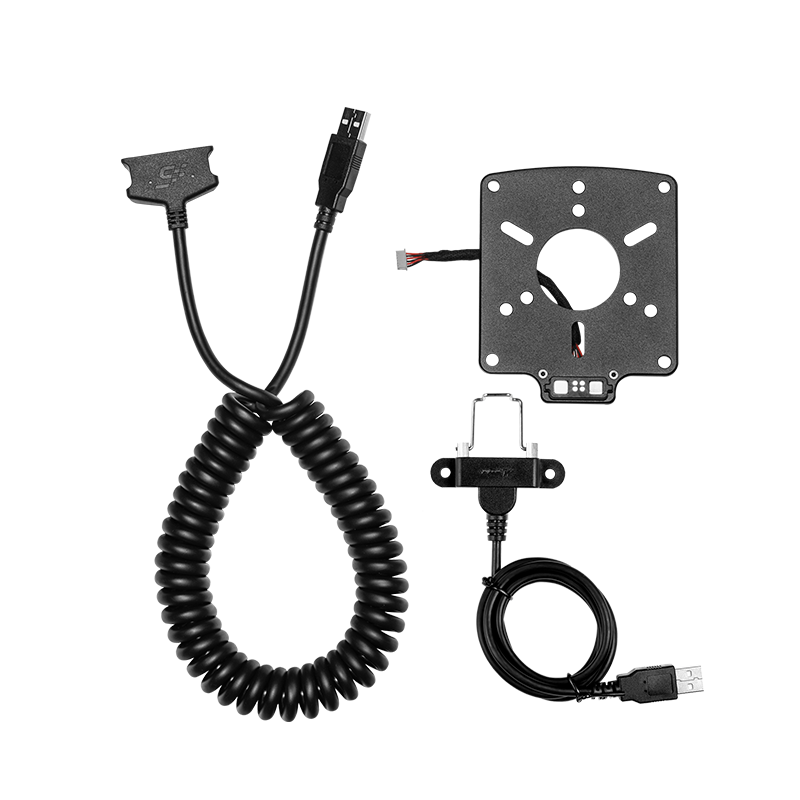
Read the MagLink installation guide before connecting to another brand’s base. SIMAGIC’s compatibility notice warns against directly using third-party wireless power with the wheel. The official MagLink quick guide describes the required rear-plate and power-connection changes. This hardware work is separate from applying a front-face sticker.
MagLink is also not the only current accessory to consider. SIMAGIC now lists GT NEO support for MagLink Pro. Its separate MagLink Pro Xtend enables GT NEO USB mode and SimHub on Alpha bases; the Xtend manual explicitly excludes EVO bases. Check the current instructions for your exact base rather than buying an accessory solely because an older video mentions it.
This guide concerns supported PC connection routes. Adding MagLink does not, by itself, establish PlayStation or Xbox compatibility.
An established wheel with current software updates
The GT NEO belongs to SIMAGIC’s 2024 product history; it is not a new September 2026 wheel. There is still relevant software activity: the official download centre lists SimPro Manager 3.2.2, released on 22 September 2026, and GT NEO firmware 1.4.4 with shifter fixes. Check the latest release notes and update instructions for your configuration instead of treating an old setup tutorial as permanent.
Choose stickers for the GT NEO face
The Lovely Stickers SIMAGIC GT NEO collection is the starting point for this wheel. Check that the individual product description names SIMAGIC GT Neo, then compare its preview with your wheel’s buttons and encoder positions. Do not substitute a kit labelled GT4, FX, FX Pro or NEO X because the colour scheme looks right.
For a modern GT look, the BMW M4 GT3 Inspired Livery combines white, blue and red with a printed carbon effect. The product shown here is the GT NEO version, reference SMN005.

The Gulf Porsche 917 Livery, reference SMN018, offers a different direction: pale blue, orange and a historic endurance-racing look. Compare the two against your cockpit colours and the markings you want to keep easy to recognise.

These are decorative vinyl kits; the steering wheel and connection accessories are not included. The linked GT NEO listings specify laminated polymer-based vinyl, application to a clean, dry surface and a layout that goes around the controls without dismantling the wheel. They are regular adhesive stickers, not kits intended for repeated removal and reapplication.
Before applying your GT NEO skin
Compare the pieces with the front face before peeling the backing. Identify the cutouts for buttons, rotary controls and lights, and check the orientation of the artwork. Keep the moving controls and lighting unobstructed. Follow the instructions supplied with your kit and work on a clean, dry surface.
The function-label sheets included with the wheel serve a different purpose from a full decorative livery: labels identify commands, while the LS design changes the surrounding appearance. Choose the combination that keeps your own control layout readable.
If your wheel has modifications or the fit is unclear, send a front-facing photo and the product link through our Contact page or email info@lovelystickers.com before ordering. Buying for someone else? Our sim racing gift guide explains which details to check with the recipient.
GT NEO questions answered
Do I need MagLink just to use a GT NEO?
Not automatically. Native SIMAGIC operation and PC USB accessory routes are different configurations. Start with your base’s current documentation and the functions you want to use, especially if SimHub is part of your plan.
Will a GT NEO sticker fit because my base is SIMAGIC?
The sticker matches the wheel’s face, not the base brand. Order for the exact GT NEO model and check the product pictures, even when several wheels share one rig.
Does fitting a skin require a MagLink conversion?
No. Front-face decoration and rear connection hardware are separate jobs. The linked LS kits are designed to go around the wheel’s controls without dismantling it.
Ready to choose a design? Browse GT NEO stickers and liveries at Lovely Stickers.
Hardware, software notes and product fitment checked on 30 September 2026 using SIMAGIC documentation and Lovely Stickers listings. This is a compatibility and personalisation guide, not a hands-on performance test. Official photographs show the original hardware; LS catalogue renderings illustrate aftermarket decoration.