
Fanatec Wheels Skin Tutorial
Fanatec GT3 Wheel Sticker Installation — Video Tutorial
Watch this step-by-step video tutorial before applying your Fanatec GT3 wheel sticker.
Author and Pictures: Fernando Duran
In this tutorial we will show you how to successfully apply your Fanatec Esport or Formula V1/Carbon skin on your wheel.

The skin's shape is made to go around every feature of your wheel such as the buttons, LEDs, screen etc...
Best practice is to clean the wheel plate before applying the skin using some alcohol to remove any dust or grease from your wheel.
Then start applying the skin from the top by centring it using the top 6 buttons and the edge (leave a very small gap between the edge and the skin, something like less than 1mm). This will ensure you are aligned with the rest of the wheel.
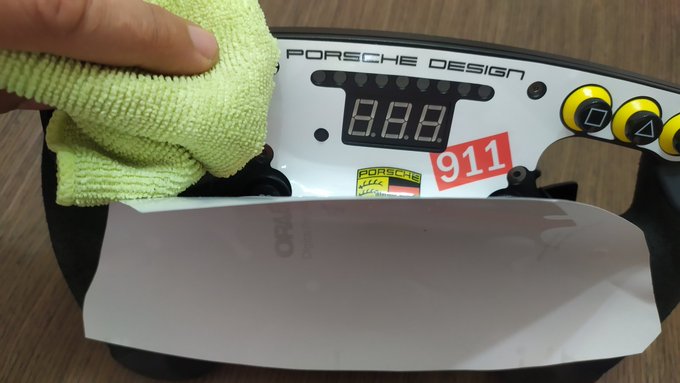
As you work your way towards the bottom, use a clean rag to remove any bubble that could get trapped between the sticker and the wheel plate. Take your time for the best result.

If something went wrong, go back and peel off the sticker. It is pretty resistant and can be peeled off slowly if needed.

Using the rag, continue to apply the sticker towards the bottom. You might have some issues with the last 3 buttons but take it slow and try to align everything as it should be.


All you have to do now are the final touches. Remove any trapped bubble with your rag. There are usually some left on the edges.
Use a light source across the surface to spot them more easily.

You are now DONE! Good job!